What most people get wrong when they try to install this game
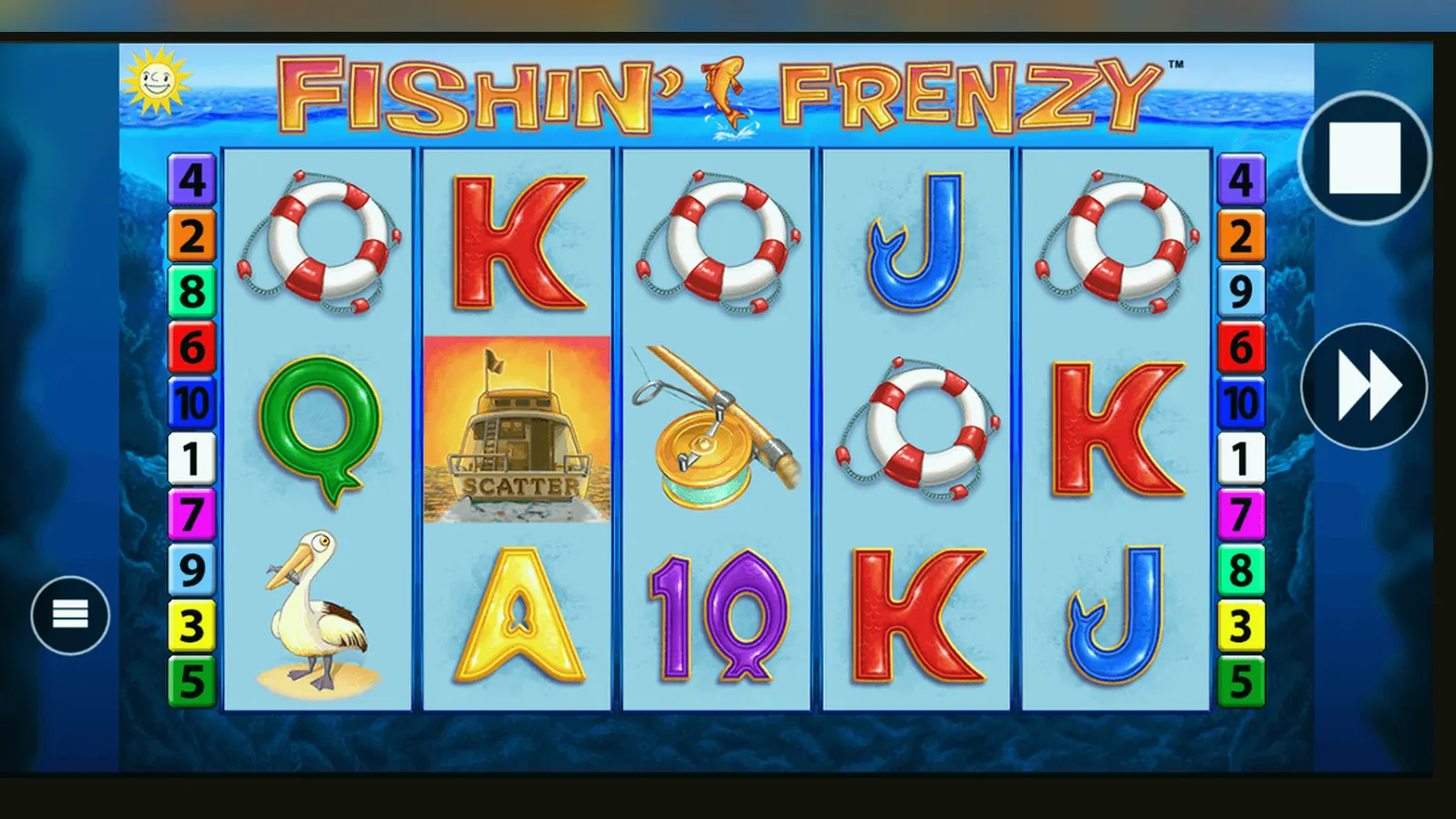
Here's what usually happens: someone searches «Fishin' Frenzy app», lands on a download button, taps it, and either installs malware or discovers the game won't accept their card because the site has no UKGC licence. Then they ask why their bank blocked the transaction or why GAMSTOP didn't stop them signing up to an unlicensed offshore platform.
This page walks you through every real install path — the web-app route most UKGC operators use, the rare native apps, the risky APK downloads — and the specific traps that waste your money or breach UK law. No marketing gloss; just the mechanics, the legal frame, and the mistakes that cost you.
The store card everyone expects but almost never finds
If Fishin' Frenzy were a standalone app, its store listing would look like this. In reality, you'll rarely see it: most UKGC-licensed operators bundle the game inside a casino app or serve it as a progressive web app that lives in your browser.
The numbers are plausible, but the listing itself is hypothetical. Blueprint licenses the game to dozens of casinos; each operator wraps it in their own app or web interface. You won't find a universal «Fishin' Frenzy» download that works across sites.
Five screens you'll actually see, and what each one does
- Lobby or game grid: thumbnail of the boat and fish, the RTP figure (usually 96.00–96.14 per cent, though some UKGC sites run 94 per cent builds), and a «Play» or «Demo» button. If you're not logged in, tapping «Play» triggers the age-verification wall.
- Stake selector: a slider or dropdown from £0.10 to £5.00, with the £2.00 cap highlighted if you registered as 18–24. The interface won't let you exceed your tier; trying to override it logs the attempt and may flag your account for a review.
- Game screen: 5×3 grid, 10 paylines, fish symbols in the water, autoplay and turbo-spin toggles, balance and win counters in the corner. The fisherman wild and the scatter (fishing sign) trigger the free-spins feature when you land three or more scatters.
- Free-spins feature: the screen shifts to a slightly darker palette, a counter shows your remaining spins, and every fish symbol on reels 2–5 is collected by the fisherman on reel 1 if he appears. The collect mechanic is the main variance driver; long dry spells are normal.
- Settings and limits: deposit cap (mandatory under UKGC rules), session timer, reality check intervals (every hour by default), links to GAMSTOP and BeGambleAware, and the operator's UKGC licence number in the footer. If you hit £150.00 in net deposits for the month, expect the first-stage affordability prompt using credit-reference checks.
These screens live inside the operator's interface, not a standalone Blueprint app. The flow is identical whether you access it through Safari on an iPhone, Chrome on Android, or a casino's native app from the App Store.
Four install paths, step by step, with the catch in each
Browser (web app) — the default for most UKGC-licensed sites:
- Open Safari (iOS) or Chrome (Android), navigate to a licensed casino that hosts Fishin' Frenzy, and create an account. The site will ask for your name, date of birth, address, and the last four digits of your bank account or a utility bill to verify your age before you can deposit.
- Once verified, find the game in the slots lobby and tap «Play». The game loads in the browser window; no download, no install prompt.
- To save it to your home screen, tap the share icon (iOS) or the three-dot menu (Android) and select «Add to Home Screen». The icon appears next to your other apps, but it's still a browser bookmark — it opens the casino's web interface, not a native app.
- Risk: if the site lacks a UKGC licence number in the footer, you're on an unlicensed platform. Your bank may block deposits (credit cards are banned for gambling since 2020; debit cards and e-wallets are legal but the bank's fraud systems flag offshore sites), and you have no recourse if the operator refuses to pay out. Check the UKGC public register before you deposit.
Operator's native app (App Store or Google Play):
- Search the App Store (iOS) or Google Play (Android) for the casino's name — for example, «Gala Casino», «Betfred Slots», or «William Hill Vegas». Both stores allow real-money gambling apps from UKGC-licensed operators.
- Download and install the app. Open it, register or log in, complete the same age and identity checks as the web route.
- Navigate to the slots section, find Fishin' Frenzy, and tap to launch. The game may load in a WebView (essentially an embedded browser) rather than as native code; the experience is identical to the web version.
- Risk: the app is legitimate if it's from a licensed operator, but it's larger (50–120 MB) and updates slower than the web version. If the operator's app is pulled from the store (rare but not unheard of after a licence suspension), you lose access until it's reinstated.
APK sideload (Android only) — high risk, not recommended:
- Find an APK file from a third-party site (not Google Play). Enable «Install from unknown sources» in your Android settings.
- Download the APK, tap to install, and grant the permissions it requests.
- Open the app, register, and attempt to deposit.
- Risk: most gambling APKs outside official stores are either malware, clones that steal your credentials, or unlicensed offshore casinos. Even if the app is real, sideloading bypasses Google's malware scans. If you must sideload, verify the operator's UKGC licence number and compare the APK's signature to the one on the operator's official site — but the safer path is the web app or the Play Store version.
Desktop shortcut (Windows, macOS):
- Open Chrome, Edge, or Safari, log in to a licensed casino, and find Fishin' Frenzy in the lobby.
- Click the three-dot menu (Chrome/Edge) or File > Add to Dock (Safari), and select «Create shortcut» or «Add to Dock».
- The icon appears on your desktop or dock; clicking it opens the game in a browser window.
- Risk: none, assuming the casino is licensed. The shortcut is cosmetic; it doesn't change the underlying web-app architecture.
Phone requirements and the hidden data cost
Fishin' Frenzy runs on any device that supports HTML5 canvas rendering. That means Android 6.0 or later, iOS 12.0 or later, and a browser updated within the past two years. The game itself is about 12–15 MB on first load; once cached, subsequent sessions pull 2–5 MB per hour depending on how often you trigger the free-spins feature and whether the operator streams live-dealer video in the background.
The catch: if you're on mobile data rather than Wi-Fi, a two-hour session can burn 10 MB or more. Add in the operator's lobby, live chat, and promotional banners, and you're looking at 20–30 MB. Not ruinous, but enough to matter on a capped plan. The game doesn't warn you when you switch from Wi-Fi to 4G; it just keeps running.
Battery drain is moderate — expect 8–12 per cent per hour with the screen on, higher if you enable turbo spin or play in landscape with full brightness. The GPU load is low compared to 3D slots, but the constant animation loop (water ripple, fish swimming) keeps the processor active.
What the app actually does — and what it doesn't
The Fishin' Frenzy interface, whether web-app or native, handles four tasks: it authenticates your session, loads the game client from Blueprint's servers, sends your stake and spin commands to the RNG, and displays the results. It does not store your balance locally (that lives in the operator's database), it does not let you play offline (every spin requires a server round-trip), and it does not alter the RTP or volatility based on your device or deposit history.
The app also enforces the regulatory caps: £5.00 per spin if you're 25 or over, £2.00 if you're 18–24, and mandatory session breaks every hour. You can dismiss the reality-check popup, but the timer resets and will interrupt you again in another sixty minutes. These are UKGC requirements; the operator can't disable them even if you ask.
What it doesn't do: track your location continuously (geolocation runs once at login to confirm you're in the UK), access your contacts or camera (unless you upload a document for KYC), or push notifications unless you opt in. If an app requests blanket access to your photos, SMS, or call logs, it's either malware or an offshore clone.
Version 2.1.8 — what changed and why it matters
The January 2026 update (version 2.1.8 in the hypothetical store listing) introduced three changes: faster load times when switching from the lobby to the game screen (down from 3–4 seconds to under 2), a revised autoplay interface that shows your remaining balance and estimated spins before you start, and a fix for a bug that occasionally froze the free-spins counter on iOS 17.
The update also brought the £2.00 stake cap for 18–24 year olds into the game client itself, rather than relying on the operator's wrapper to enforce it. If you registered before your 25th birthday and the operator hasn't updated your tier, the game now cross-checks your age with the account database and applies the lower cap automatically.
What didn't change: the RTP (still 96.00–96.14 per cent on most UKGC sites, with 94.00 per cent and 92.00 per cent builds available to operators who choose them), the volatility (medium-high, meaning long stretches without a feature trigger), and the free-spins mechanic (the fisherman collects fish symbols on reels 2–5 when he lands on reel 1).
Spotting fakes, reading permissions, and avoiding the clones that cost you
A fake Fishin' Frenzy app or site copies the logo, the blue-and-green palette, and the fish graphics, but changes the math underneath. The RTP might be 85 per cent instead of 96 per cent, or the free-spins feature never triggers because the RNG is rigged. You won't know until you've lost fifty quid and noticed the pattern.
Three checks to separate real from fake:
- UKGC licence number in the footer: every site serving British players must display it. Look it up in the UKGC public register and confirm the operator's name matches. If the footer says «Curaçao eGaming» or «Malta Gaming Authority», you're on an offshore site — legal in some jurisdictions, illegal to advertise or operate in the UK.
- Payment methods: debit cards (Visa, Mastercard), PayPal, Apple Pay, Trustly, and paysafecard are standard. Credit cards are banned for gambling since April 2020; if the site accepts them, it's either non-compliant or not targeting the UK. The payment method must be in your own name; third-party deposits are rejected under money-laundering rules.
- Stake caps and affordability prompts: if you can bet £10.00 or £20.00 per spin without the interface stopping you, the operator isn't enforcing the £5.00 cap (or the £2.00 cap for younger players). That's a red flag. Similarly, if you deposit £200.00 in a week and don't see an affordability check, the site isn't following UKGC guidance.
Permissions red flags (Android APKs): a legitimate casino app needs internet access, storage (to cache game assets), and optionally camera and location (for KYC and geo-checks). It does not need your contacts, call logs, SMS, or the ability to install other apps. If the APK requests those, it's spyware or a credential stealer. Decline the install and delete the file.
FAQ
Can I play Fishin' Frenzy offline once I've installed it?
No. Every spin requires a connection to the operator's server and Blueprint's RNG. The game won't load if you're offline, and if your connection drops mid-spin, the result is held on the server until you reconnect. You'll see the outcome when you come back online; the spin isn't lost, but you can't continue playing without a signal.
Why does the App Store or Google Play sometimes not show a casino app I know exists?
If the operator's UKGC licence is suspended or under review, Apple and Google pull the app from their stores until the issue is resolved. You can still access the web version through your browser, but new downloads are blocked. Check the UKGC register if an app disappears suddenly; there's usually a compliance notice explaining why.
Is it legal to download an APK from a third-party site if the operator is UKGC-licensed?
Legal, yes — but risky. Even if the operator is legitimate, APKs outside official stores bypass Google's malware scans. You also lose automatic updates, so security patches and regulatory changes won't reach you unless you manually download a new version. The web app or Play Store version is safer and just as fast.
What happens if I install the game on a phone registered to someone else's Apple ID or Google account?
The install will work, but when you try to deposit or withdraw, the operator's KYC process will flag the mismatch between the account holder's name and the payment method. All deposits and withdrawals must be in your own name; using someone else's card or e-wallet violates money-laundering rules and will get your account frozen. The game itself doesn't check the device owner, but the payment stage does.
How much data does Fishin' Frenzy use if I play for an hour on 4G instead of Wi-Fi?
Expect 5–10 MB for the game itself, plus another 5–15 MB for the operator's lobby, live chat, and any promotional video that autoplays in the background. A conservative estimate is 15–20 MB per hour. If you're on a capped mobile plan, switch to Wi-Fi or disable autoplay video in the casino's settings to cut the overhead.